
Most of the time, you might be working with command prompt and text editors to develop django based website.
If you are an eclipse lover, you can use PyDev plug-in, which is an excellent tool that helps django developers in working with IDE
Prerequisites:
If you are an eclipse lover, you can use PyDev plug-in, which is an excellent tool that helps django developers in working with IDE
Prerequisites:
- Java
- If you are working on Ubuntu, run the following commands
- Install JRE by running the command, "sudo apt-get install openjdk-6-jre-headless"
- Install JDK by running "sudo apt-get install openjdk-6-jdk"
- Download eclipse from eclipse.org
- you can download eclipse classic
- extract the tar file
- launch "eclipse" from the extracted folder
- Install PyDev Plugin
- Go to "Help > Install new software"
- Click on "Add"
- From the 'Add Repository' window, enter some name for 'Name' field, say 'PyDev' and 'http://pydev.org/updates' in the 'Location' field.
- Click on 'OK'

- Select "PyDev", and click on 'Next'
- Select 'Next' for the 'Install Details' window
- Accept the licence agreement by selecting the 'I accept ..." radio button and click on 'Finish'
- Wait for the software get download and install
- When prompted to select the certificates (window with text 'Do you want to trust these certificates?' with options 'Aptana Pydev; Pydev'), select the certificate and click on 'OK'
- After installation, eclipse prompts you to reboot the application
- From the Eclipse, go to "Window > Preferences > PyDev > Interpreter-Python", click on 'Auto Config', and then select 'OK'

- Click on 'Apply' and then 'OK'
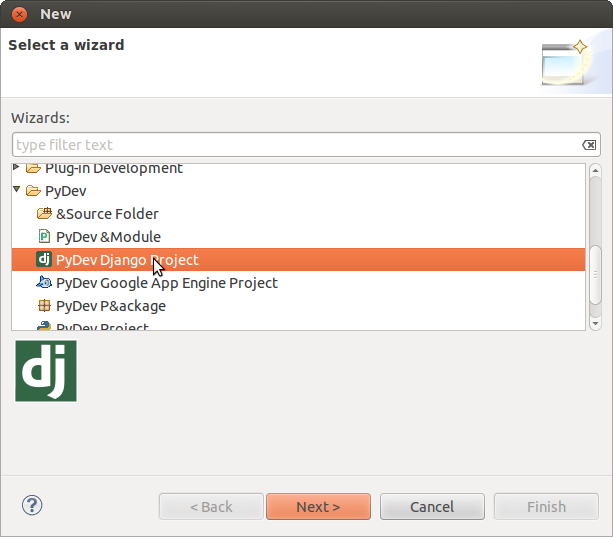
- Now, you can create Django project by going to "File > New > Other > PyDev > PyDev Django Project"


